MCP in Plain English: What It Is, Why It Matters, and How to Use It Today
The clearest explanation of Model Context Protocol (MCP) you'll find — covering what it actually is, why it was built, how the client/server model works, and a hands-on tutorial for building your first MCP server.
MCP in Plain English: What It Is, Why It Matters, and How to Use It Today
MCP (Model Context Protocol) is an open standard that lets AI models talk to external tools and data sources using a consistent interface. Instead of building a custom integration every time you want Claude to read your files, query your database, or call your API — you build one MCP server, and any MCP-compatible AI client can use it. Think of it like a universal translator for AI tools. This post explains it from scratch, including a working example you can run today.
Table of Contents
- The Problem MCP Solves
- What MCP Actually Is
- The Universal Translator Analogy
- How MCP Is Structured
- The Tool Calling Workflow
- Building Your First MCP Server
- MCP vs Everything Else
- Real-World Use Cases
- Security Considerations
- Common Beginner Mistakes
- Current Limitations
- Where MCP Is Heading
- FAQ
The Problem MCP Solves
Here's the situation before MCP existed.
You're building a coding assistant. You want it to read your local files. So you write a custom function calling schema, wire it to your file reader, test it, and ship it.
Then you want it to search GitHub. Another custom integration. Different schema, different error handling, different auth.
Then you want it to run SQL queries. Another one. Then search Slack. Then read PDFs.
Six months later, you have twelve custom integrations, all slightly different, all maintained separately. When you switch from GPT-4 to Claude, half of them break because the function calling format is different. When the LLM API changes, you update twelve things.
Meanwhile, another team at another company built the same GitHub integration. And the same Slack integration. Everyone is building the same adapters independently.
MCP is Anthropic's answer to this problem: define one standard protocol for AI-to-tool communication, so integrations are built once and work everywhere.
What MCP Actually Is
MCP is a specification — an open protocol, published by Anthropic — that defines how AI models (clients) communicate with tool providers (servers).
It's not a framework, not a library, not a hosted service. It's a communication standard, similar to how HTTP defines how browsers and web servers talk to each other. You can implement MCP in any language, on any platform.
The spec covers:
- How an AI client discovers what tools a server offers
- How the AI calls a tool with specific inputs
- How the server returns results
- How to pass context, documents, and structured data back and forth
That's it. The magic is in the standardization, not the technology.
The Universal Translator Analogy (and Why It Works)
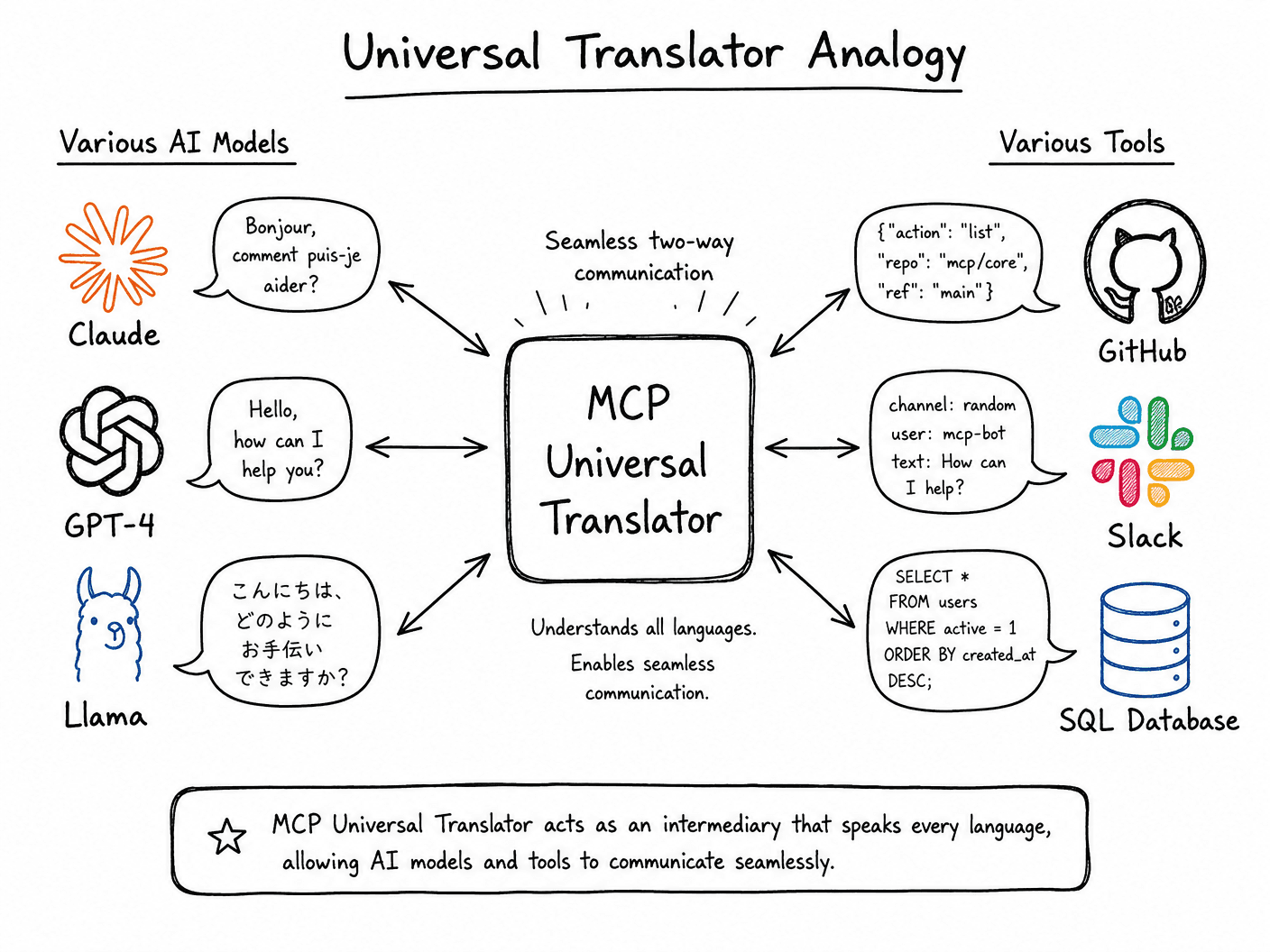
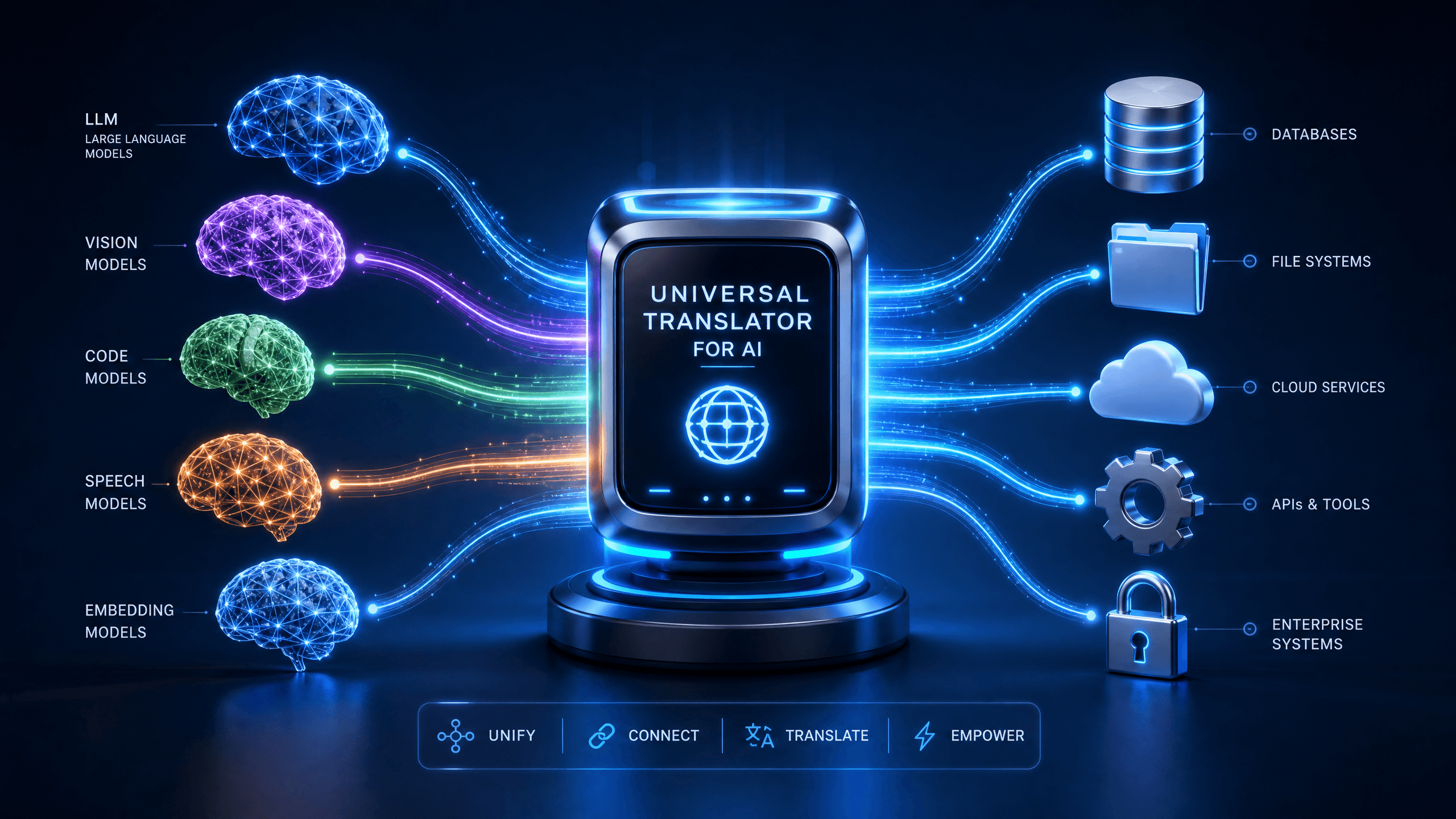
Before universal translators, every species had its own language. Communication was chaotic — if you didn't speak the specific language, you were stuck.
A universal translator standardizes communication. Now, any two entities can speak their native tongue, and the translator handles the conversion. The translator doesn't know the origin of the message, nor does the recipient care about the original language; they just agree on a standard interface.
MCP is doing the same thing for AI tools.
Before MCP:
- Claude's function calling ≠ GPT-4's function calling
- LangChain tools ≠ AutoGPT tools
- Every AI assistant needed its own custom adapters
With MCP:
- Build a GitHub MCP server once
- Any MCP-compatible AI client can use it — Claude Desktop, Cursor, your custom agent, anything
The server doesn't know which AI is calling it. The AI doesn't care which server implementation is running. They both speak MCP.
How MCP Is Structured
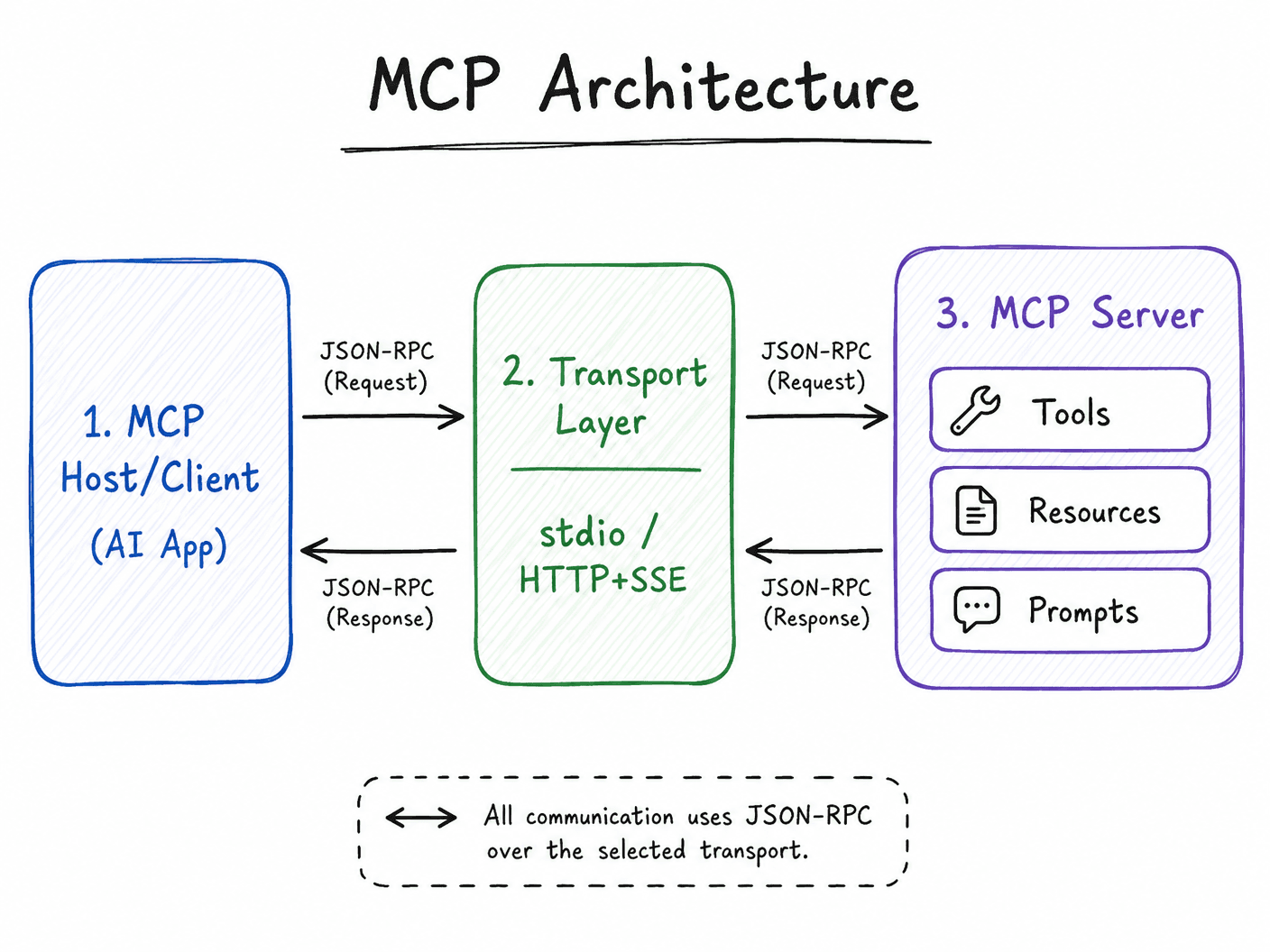
MCP has a client-server architecture. Here's what each piece does:
MCP Host / Client
The AI application — Claude Desktop, Cursor, a custom agent you built — is the MCP host. It initiates connections to MCP servers. When the AI decides it needs to call a tool (say, read a file or search GitHub), the host sends the request through the MCP protocol.
MCP Server
A lightweight process that exposes capabilities to the AI. A server can expose three types of things:
Tools — Functions the AI can call. "Search files," "run a git command," "query the database." Tools are the most commonly used capability.
Resources — Read-only data that can be included in the AI's context. A resource might be a file, a database record, a URL's contents. The AI can request a resource to get information without "calling" anything.
Prompts — Pre-defined prompt templates that the server provides. Less commonly used, but useful for specialized workflows.
Transport Layer
MCP currently supports two transports:
- stdio — The client launches the server as a subprocess and communicates via stdin/stdout. Simple, works everywhere, used in Claude Desktop.
- HTTP with SSE — For remote servers, MCP uses Server-Sent Events for streaming responses. Good for shared/hosted MCP servers.
JSON-RPC
Under the hood, all MCP communication uses JSON-RPC 2.0. Requests look like this:
{
  "jsonrpc": "2.0",
  "id": 1,
  "method": "tools/call",
  "params": {
    "name": "read_file",
    "arguments": {
      "path": "/home/user/notes.txt"
    }
  }
}
And responses:
{
  "jsonrpc": "2.0",
  "id": 1,
  "result": {
    "content": [
      {
        "type": "text",
        "text": "My notes content here..."
      }
    ]
  }
}
The Tool Calling Workflow
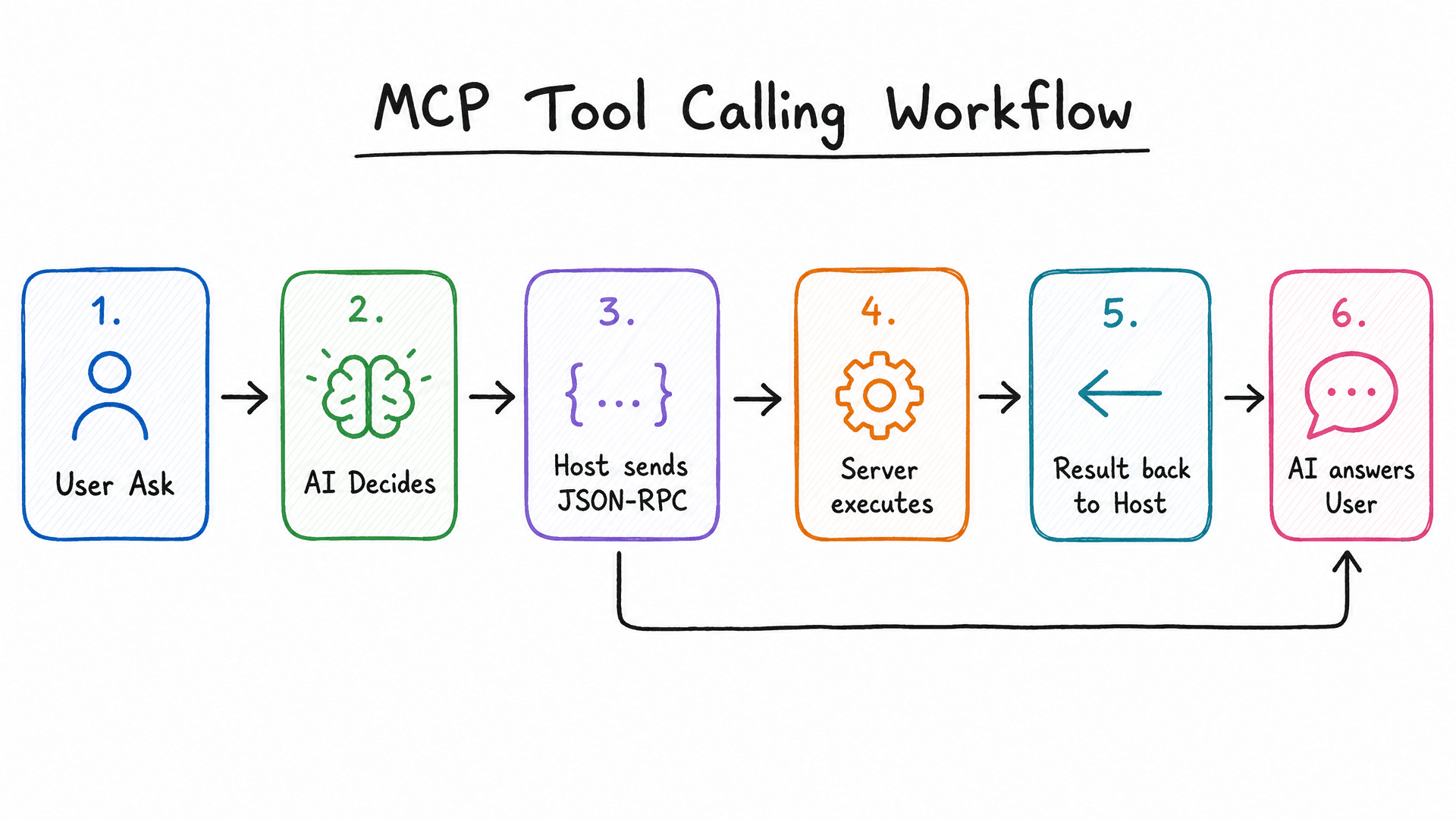
Here's the full lifecycle of a single tool call, step by step:
1. User: "What's in my project README?"

2. Claude decides it needs to read a file
   → Checks available tools from connected MCP servers
   → Finds "read_file" tool from filesystem MCP server

3. Claude sends tool call request:
   Method: tools/call
   Tool: read_file
   Args: { "path": "README.md" }

4. MCP server receives request
   → Validates the path
   → Reads the file
   → Returns content

5. Claude receives file content
   → Processes it
   → Responds to user with the README contents
The AI never directly reads the file. It requests the tool call, gets back results, and uses those results to answer. This indirection is deliberate — it keeps the AI in a thinking-and-requesting role, with the actual side-effectful work happening in the MCP server.
Building Your First MCP Server
Here's a minimal working MCP server in TypeScript using Anthropic's official SDK. This one exposes a single tool: read a file from disk.
Setup
mkdir my-mcp-server
cd my-mcp-server
npm init -y
npm install @modelcontextprotocol/sdk
npm install -D typescript @types/node
npx tsc --init
Folder Structure
my-mcp-server/
├── src/
│   └── index.ts
├── package.json
└── tsconfig.json
tsconfig.json
{
  "compilerOptions": {
    "target": "ES2020",
    "module": "commonjs",
    "lib": ["ES2020"],
    "outDir": "./dist",
    "rootDir": "./src",
    "strict": true,
    "esModuleInterop": true,
    "skipLibCheck": true,
    "resolveJsonModule": true
  },
  "include": ["src"],
  "exclude": ["node_modules"]
}
The Server (src/index.ts)
import { Server } from "@modelcontextprotocol/sdk/server/index.js";
import { StdioServerTransport } from "@modelcontextprotocol/sdk/server/stdio.js";
import {
  CallToolRequestSchema,
  ListToolsRequestSchema,
} from "@modelcontextprotocol/sdk/types.js";
import * as fs from "fs";
import * as path from "path";

// Initialize the MCP server
const server = new Server(
  {
    name: "filesystem-server",
    version: "1.0.0",
  },
  {
    capabilities: {
      tools: {},
    },
  }
);

// Declare available tools
server.setRequestHandler(ListToolsRequestSchema, async () => {
  return {
    tools: [
      {
        name: "read_file",
        description: "Read the contents of a file from disk",
        inputSchema: {
          type: "object",
          properties: {
            path: {
              type: "string",
              description: "Absolute or relative path to the file",
            },
          },
          required: ["path"],
        },
      },
      {
        name: "list_directory",
        description: "List files in a directory",
        inputSchema: {
          type: "object",
          properties: {
            path: {
              type: "string",
              description: "Path to the directory",
            },
          },
          required: ["path"],
        },
      },
    ],
  };
});

// Handle tool calls
server.setRequestHandler(CallToolRequestSchema, async (request) => {
  const { name, arguments: args } = request.params;

  if (name === "read_file") {
    const filePath = args?.path as string;

    // Basic path validation — always sanitize user input
    const resolvedPath = path.resolve(filePath);
    const allowedBase = path.resolve("./workspace");

    if (!resolvedPath.startsWith(allowedBase)) {
      return {
        content: [
          {
            type: "text",
            text: "Error: Access denied. Path is outside the allowed workspace.",
          },
        ],
        isError: true,
      };
    }

    try {
      const content = fs.readFileSync(resolvedPath, "utf-8");
      return {
        content: [
          {
            type: "text",
            text: content,
          },
        ],
      };
    } catch (err) {
      return {
        content: [
          {
            type: "text",
            text: `Error reading file: ${(err as Error).message}`,
          },
        ],
        isError: true,
      };
    }
  }

  if (name === "list_directory") {
    const dirPath = args?.path as string;

    try {
      const files = fs.readdirSync(dirPath);
      return {
        content: [
          {
            type: "text",
            text: files.join("\n"),
          },
        ],
      };
    } catch (err) {
      return {
        content: [
          {
            type: "text",
            text: `Error listing directory: ${(err as Error).message}`,
          },
        ],
        isError: true,
      };
    }
  }

  return {
    content: [{ type: "text", text: `Unknown tool: ${name}` }],
    isError: true,
  };
});

// Start the server with stdio transport
async function main() {
  const transport = new StdioServerTransport();
  await server.connect(transport);
  console.error("Filesystem MCP server running on stdio");
}

main().catch(console.error);
Build and Test
npx tsc
node dist/index.js
Connect to Claude Desktop
Add this to your Claude Desktop config (~/Library/Application Support/Claude/claude_desktop_config.json on Mac):
{
  "mcpServers": {
    "filesystem": {
      "command": "node",
      "args": ["/absolute/path/to/my-mcp-server/dist/index.js"]
    }
  }
}
Restart Claude Desktop, and Claude now has access to read_file and list_directory tools backed by your server.
Testing the Protocol Directly
You can also test the MCP protocol by sending JSON-RPC manually via stdin:
echo '{"jsonrpc":"2.0","id":1,"method":"tools/list","params":{}}' | node dist/index.jsExpected output:
{
  "jsonrpc": "2.0",
  "id": 1,
  "result": {
    "tools": [
      {
        "name": "read_file",
        "description": "Read the contents of a file from disk",
        "inputSchema": { ... }
      },
      {
        "name": "list_directory",
        ...
      }
    ]
  }
}
MCP vs Everything Else
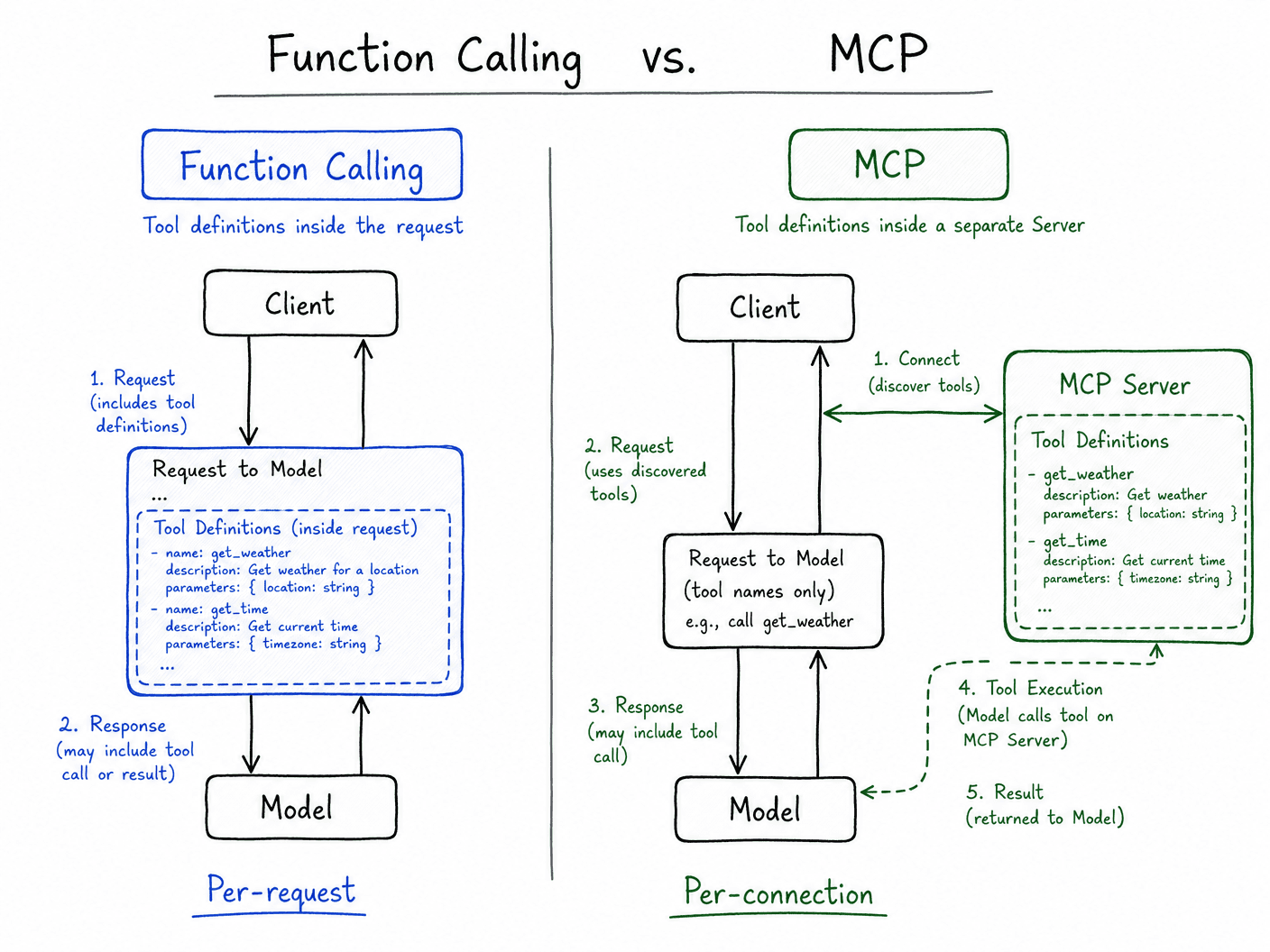
MCP vs Function Calling
Function calling (in OpenAI, Anthropic, Gemini) lets you define tools inline in the API request. Every time you make an API call, you pass the function definitions in the request payload.
MCP is a separate protocol where tool definitions live in a server, not in the API request. The AI discovers available tools by querying connected MCP servers. The big difference: function calling is per-request, MCP is per-connection. And MCP is portable across any AI provider.
| | Function Calling | MCP | |-|-----------------|-----| | Tool definitions | Inline in each API request | Stored in MCP server | | Portability | Provider-specific | Works with any MCP client | | Stateful connections | No | Yes | | Tool discovery | Manual | Automatic via list/tools | | Best for | Single-provider apps | Multi-model, reusable tools |
MCP vs APIs
Calling an external API directly from your app code is not the same as an MCP server. With a direct API, your app code calls the API. With MCP, the AI decides to call the tool, the MCP server makes the API call, and results come back to the AI.
MCP puts the AI in the driver's seat. Your code isn't orchestrating the flow anymore — the AI is.
MCP vs LangChain Tools
LangChain tools are tightly coupled to the LangChain framework. If you build a LangChain tool, it works with LangChain agents. MCP tools are framework-agnostic — build an MCP server once, and any MCP client can use it, LangChain-based or not.
MCP vs Traditional Integrations
A traditional integration is a one-to-one connection: Slack webhook, Zapier zap, custom API adapter. Each integration is purpose-built for one specific workflow.
MCP is a general-purpose protocol. One MCP server can serve any number of AI clients. One AI client can connect to any number of MCP servers. The combinatorics are much better.
Real-World Use Cases
- Local Development: Cursor and Claude Desktop using MCP to read your local codebase, run tests, and commit code.
- Enterprise Search: An internal MCP server that connects to Confluence, Jira, and Google Drive, allowing any approved AI client to search company knowledge.
- Database Querying: An MCP server that safely executes read-only SQL queries against a production database, returning results to the AI for analysis.
- Browser Automation Agent: An MCP server running Playwright or Puppeteer. Tools:
navigate_to,click_element,fill_form,take_screenshot,get_page_text. The AI can drive a browser to complete tasks — filling forms, scraping data, testing UIs.
GitHub Workflow Assistant
Anthropic ships an official GitHub MCP server. Connect it to Claude Desktop and ask "what issues are assigned to me" or "create a PR for this branch." The AI calls the right GitHub API endpoints through the MCP server, no manual integration needed.
Security Considerations
MCP servers have real access to real systems. A few things to think about carefully:
What the AI can access, attackers might be able to access too. If your MCP server can read files, a prompt injection attack (where malicious content in a file tricks the AI) could cause it to read and exfiltrate sensitive files. Scope your tools as narrowly as possible.
Validate every input. The AI is generating the arguments to your tool calls. Never assume they're safe. Sanitize file paths, validate SQL queries, check for injection patterns.
Principle of least privilege. Your database MCP server should use a read-only database user, not your admin credentials. Your filesystem server should be scoped to a specific directory, not /.
Be careful with stdio servers. A malicious actor who can modify your Claude Desktop config can point it at a rogue MCP server. Treat MCP servers like any other executable you run on your machine.
Remote servers need authentication. For HTTP-based MCP servers accessible over the network, implement proper authentication (API keys, OAuth) before opening them to the internet.
Common Beginner Mistakes
Not validating file paths. Path traversal (../../etc/passwd) is real. Resolve the path and check it's within your allowed directory before doing anything.
Returning too much data. If your read_file tool returns a 50MB file, you've just consumed the entire context window. Limit output size — truncate large files, summarize where possible.
Not handling errors properly. An MCP server that crashes on bad input breaks the entire connection. Always catch exceptions and return error responses in the MCP format.
Building one giant MCP server. Separation of concerns applies here too. Build a filesystem server, a database server, a GitHub server — separately. Smaller, focused servers are easier to test, audit, and maintain.
Forgetting that the AI chooses when to call tools. You don't control when tools get called. Design your tools so they're safe to call at any time, with any inputs the AI might reasonably send.
Current Limitations
Adoption is still uneven. MCP is relatively new (announced late 2024) and not every AI application supports it yet. ChatGPT, Gemini, and most non-Anthropic products don't have MCP clients yet, though this is changing.
The stdio transport is local-only. The stdio model (launching a subprocess) only works when the MCP server is on the same machine as the client. For multi-user or cloud-based scenarios, you need HTTP+SSE, which adds operational complexity.
No built-in authentication spec. MCP itself doesn't define authentication. For local stdio servers this is usually fine; for network-accessible HTTP servers you're on your own.
Debugging is harder than typical APIs. Debugging a tool call that goes through MCP → AI → your server → back to AI → response involves multiple layers. The tooling for MCP debugging is still maturing.
Context window pressure. Every tool result goes back into the AI's context. If you're doing many tool calls with large responses, you'll hit context limits fast. Tool responses need to be concise.
Where MCP Is Heading
A few things worth watching:
Broader AI adoption. The MCP spec is open and the reference implementations are MIT-licensed. There's real incentive for other AI providers to adopt it — developers want to build integrations once. Expect more AI products to support MCP clients over the next year or two.
A growing server ecosystem. The community is building MCP servers for everything: databases, code execution, browser automation, file systems, cloud providers. A curated directory of production-ready MCP servers is emerging. Within a couple of years, most common enterprise systems will have an MCP server available.
Agent-to-agent communication. Right now MCP is about AI-to-tool communication. The natural extension is AI-to-AI — one agent calling another through a standardized protocol. MCP's architecture is well-suited for this.
Better tooling. MCP debuggers, test harnesses, server generators from OpenAPI specs. The ecosystem around the protocol is young but moving fast.
FAQ
Is MCP only for Claude?
No. Anthropic created it and open-sourced the spec. Any AI model or agent framework can implement MCP. Cursor, Continue.dev, and several other AI coding tools already support it.
Does my MCP server need to be running constantly?
For stdio transport: the MCP client (like Claude Desktop) launches the server process when it starts and keeps it running during the session. You don't need to manually start it. For HTTP servers: yes, they need to be running and accessible.
Can I use MCP without Claude Desktop?
Yes. You can build your own MCP client using the SDK. The protocol is just JSON-RPC over stdio or HTTP. Many custom AI agents connect to MCP servers programmatically.
Is there a list of available MCP servers?
The MCP servers repository on GitHub maintains a curated list of reference and community servers. As of early 2025, it includes servers for filesystem, GitHub, Slack, Google Drive, databases, browser automation, and dozens more.
Can an MCP server call another MCP server?
Technically nothing prevents it, but it's not a common pattern yet. An MCP server could itself be an MCP client, creating chains of tool calls.
How is this different from OpenAI's plugin system?
OpenAI's plugin system (now largely deprecated in favor of function calling) was specific to ChatGPT. MCP is an open standard not tied to any specific AI product or provider.
Key Takeaways
- MCP standardizes how AI models communicate with external tools, similar to how a universal translator standardizes communication between different languages.
- The architecture is simple: clients (AI apps) connect to servers (tool providers) using JSON-RPC.
- Servers expose tools (callable functions), resources (readable data), and prompts (templates).
- You can build a working MCP server in under 50 lines of TypeScript using the official SDK.
- Scope your tools narrowly, validate all inputs, and treat MCP servers like any other security-sensitive code.
- The ecosystem is growing fast — most common integrations will have pre-built MCP servers within a year.